<?xml version="1.0" encoding="utf-8"?>
<feed xmlns="http://www.w3.org/2005/Atom">
  <title>Danmo Lab Blog</title>
  
  <subtitle>A daily AI experiment lab. One drop of ink, a whole movie.</subtitle>
  <link href="https://blog.o-coc.com/en/atom.xml" rel="self"/>
  
  <link href="https://blog.o-coc.com/en/"/>
  <updated>2026-10-30T07:48:04.359Z</updated>
  <id>https://blog.o-coc.com/en/</id>
  
  <author>
    <name>Danmo Lab</name>
    
  </author>
  
  <generator uri="https://hexo.io/">Hexo</generator>
  
  <entry>
    <title>The H3 Prompt Formula: A Reusable Structure, Not a Lucky Sentence</title>
    <link href="https://blog.o-coc.com/en/2026/10/30/h3-prompt-formula/"/>
    <id>https://blog.o-coc.com/en/2026/10/30/h3-prompt-formula/</id>
    <published>2026-10-30T07:26:37.000Z</published>
    <updated>2026-10-30T07:48:04.359Z</updated>
    
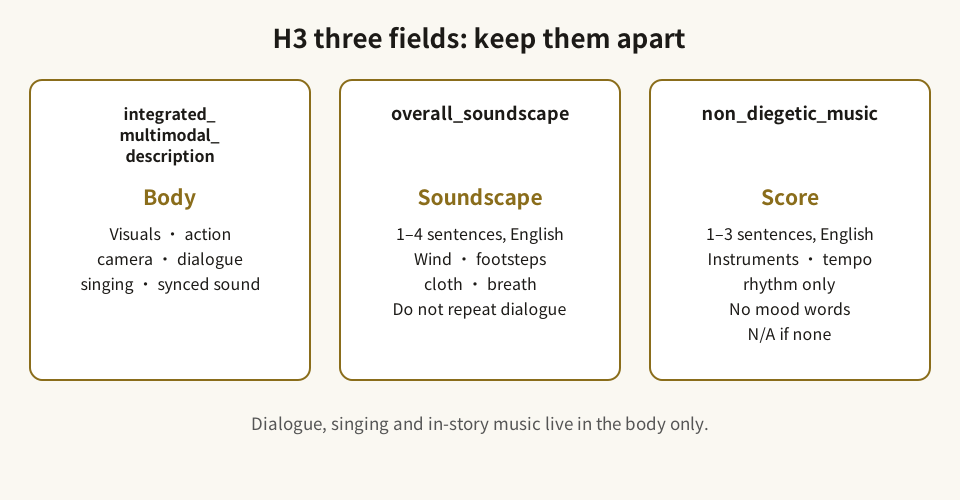
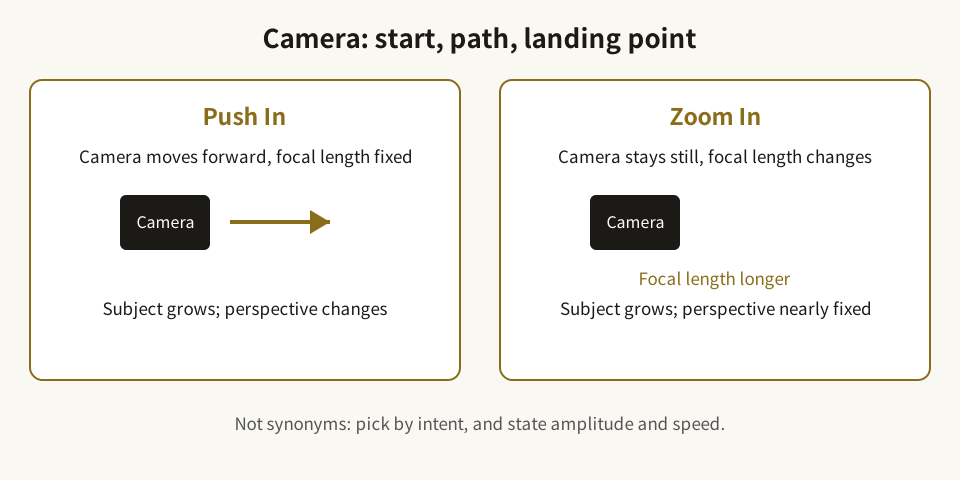
    <content type="html"><![CDATA[<blockquote><p>中文版：<a href="/2026/10/30/h3-prompt-formula/">H3 提示词公式：一套能复用的写法，而不是碰运气的句子</a></p></blockquote><h1 id="The-H3-Prompt-Formula-A-Reusable-Structure-Not-a-Lucky-Sentence"><a href="#The-H3-Prompt-Formula-A-Reusable-Structure-Not-a-Lucky-Sentence" class="headerlink" title="The H3 Prompt Formula: A Reusable Structure, Not a Lucky Sentence"></a>The H3 Prompt Formula: A Reusable Structure, Not a Lucky Sentence</h1><p>The most common mistake in video prompting is treating a prompt as a single flash of inspiration: you have a subject and a scene, you submit, and when the result disappoints you cannot say exactly what went wrong. MiniMax’s official guides take the opposite approach: split “what to shoot, how to shoot it, and what to hear” into fixed fields, then fill in the details required by each mode. The formula below comes from the official prompt-writing guides and the Hailuo official tutorial. Use it as a pre-writing checklist — not as a promise that any single generation will turn out well.</p><h2 id="1-The-Chinese-base-formulas-learn-two-sentences-before-going-precise"><a href="#1-The-Chinese-base-formulas-learn-two-sentences-before-going-precise" class="headerlink" title="1. The Chinese base formulas: learn two sentences before going precise"></a>1. The Chinese base formulas: learn two sentences before going precise</h2><p>The Hailuo official tutorial gives two formulas. The difference is only whether you have a clear requirement for the camera.</p><p><strong>Basic formula (no specific camera requirement):</strong></p><blockquote><p>Main subject + scene &#x2F; space + movement &#x2F; change</p></blockquote><p>For example: a paper boat spinning in a rain puddle; a street vendor flipping food under night-market lights.</p><p><strong>Precise formula (when you have a clear camera or visual requirement):</strong></p><blockquote><p>Main subject + scene &#x2F; space + movement &#x2F; change + camera movement + aesthetic atmosphere</p></blockquote><p>For example: a paper boat spinning in a rain puddle, the camera slowly pushing in on the boat, in a cool, realistic tone; a vendor flipping food under night-market lights, the camera first holding on the hands, then slowly pulling back to reveal the stall, in warm, lively colors.</p><p>The official tutorial states two principles worth pinning above your desk: <strong>more precise expression leads to more accurate presentation; richer expression leads to better generation.</strong> “Richer” does not mean piling on adjectives. It means giving each part — subject, space, action, camera, lighting, and sound — one verifiable piece of information.</p><h2 id="2-H3’s-three-field-structure-keep-the-body-the-soundscape-and-the-music-apart"><a href="#2-H3’s-three-field-structure-keep-the-body-the-soundscape-and-the-music-apart" class="headerlink" title="2. H3’s three-field structure: keep the body, the soundscape, and the music apart"></a>2. H3’s three-field structure: keep the body, the soundscape, and the music apart</h2><p>The four base modes — T2VA (text-to-video), I2VA (image-to-video), FL2VA (first-and-last-frame), and L2VA (last-frame) — share three core fields. Understanding this division matters more than memorizing a template:</p><ol><li><strong><code>integrated_multimodal_description</code> (the body):</strong> a timeline-ordered description of visuals, actions, camera moves, speakers, dialogue, singing, and sound synced to the picture. This is the main body, and also where prompts most easily sprawl.</li><li><strong><code>overall_soundscape</code>:</strong> 1–4 English sentences summarizing the whole film’s ambience, physical action sounds, and non-verbal human sounds — wind, footsteps, clothing rustle, breathing. Do not repeat dialogue, singing, or in-story music here; those already live in the body.</li><li><strong><code>non_diegetic_music</code>:</strong> 1–3 English sentences describing score that only the audience hears. Describe instruments, tempo, rhythm, and dynamics only. Do not use abstract mood words, and do not explain what feeling the music is supposed to create. Write <code>N/A</code> when there is no background music; write <code>N/A</code> in the soundscape field only when total silence is explicitly requested.</li></ol><p>A frequent failure is stuffing every sound into the body, or writing mood words into the music field. When the fields are separated, the model can tell “sound that exists inside the scene” from “music added on top.”</p><p><img src="/en/img/h3-three-fields-en.svg" alt="H3 three-field diagram"><br><em>Diagram: three fields, kept apart — body, soundscape, score.</em></p><h2 id="3-Shots-and-cuts-cut-only-for-new-information"><a href="#3-Shots-and-cuts-cut-only-for-new-information" class="headerlink" title="3. Shots and cuts: cut only for new information"></a>3. Shots and cuts: cut only for new information</h2><ul><li><code>[Shot 1]</code> takes no timestamp. Open it by declaring the overall style and initial composition first, for example <code>Cinematic</code>, <code>live-action</code>, <code>2D-animated</code>, or <code>watercolor</code>. Image-based modes derive the style from the reference image; text-only modes take it from your description.</li><li>Later shots use an increasing shot number and a strictly increasing cut time, for example <code>[Shot 2] At 00:03.500, the camera cuts to...</code>.</li><li>The cut rule is clean: <strong>a cut must introduce new information about the subject, space, state, viewpoint, or time. If only the framing distance or a slight angle changes, use a camera move instead of a cut.</strong></li><li>First-and-last-frame (FL2VA) normally uses a single continuous shot interpolating from the first frame to the last; use multiple shots only when explicitly required, and the final shot must land exactly on the last frame at the end of the video.</li></ul><p>In short: do not cut frequently just to look rich. Every cut should give the viewer one new piece of information.</p><h2 id="4-Camera-Chinese-instructions-or-English-“type-amplitude-speed”"><a href="#4-Camera-Chinese-instructions-or-English-“type-amplitude-speed”" class="headerlink" title="4. Camera: Chinese [instructions] or English “type + amplitude + speed”"></a>4. Camera: Chinese <code>[instructions]</code> or English “type + amplitude + speed”</h2><h3 id="Chinese-instruction-syntax-Hailuo-02-2-3-Director-series"><a href="#Chinese-instruction-syntax-Hailuo-02-2-3-Director-series" class="headerlink" title="Chinese [instruction] syntax (Hailuo-02 &#x2F; 2.3 &#x2F; Director series)"></a>Chinese <code>[instruction]</code> syntax (Hailuo-02 &#x2F; 2.3 &#x2F; Director series)</h3><p>The official documentation supports 15 camera instructions: <code>[左移]</code> <code>[右移]</code> <code>[左摇]</code> <code>[右摇]</code> <code>[推进]</code> <code>[拉远]</code> <code>[上升]</code> <code>[下降]</code> <code>[上摇]</code> <code>[下摇]</code> <code>[变焦推近]</code> <code>[变焦拉远]</code> <code>[晃动]</code> <code>[跟随]</code> <code>[固定]</code>.</p><p>Rules for use:</p><ul><li>Multiple instructions inside one bracket take effect at the same time, for example <code>[左摇,上升]</code>; combining more than three is not recommended.</li><li>Instructions appearing one after another in the prompt execute in sequence, for example <code>[推进]</code> first, then <code>[拉远]</code>.</li><li>Natural-language camera descriptions are also supported, but the standard instructions usually give a more accurate response.</li><li>The Chinese tutorial recommends keeping a single camera movement within 5–6 seconds, and avoiding overly complex moves that risk generation failure.</li></ul><h3 id="English-natural-language-camera-H3-guide"><a href="#English-natural-language-camera-H3-guide" class="headerlink" title="English natural-language camera (H3 guide)"></a>English natural-language camera (H3 guide)</h3><p>A complete camera expression has three dimensions: <strong>movement type + amplitude + speed</strong>. Write amplitude and speed only when they matter; medium amplitude and normal speed are usually omitted.</p><p>The key distinction: <code>Zoom In</code> moves only the focal length while the camera body stays still; <code>Push In</code> moves the whole camera forward through space. They look different, and the model distinguishes them, so choose by intent rather than treating them as synonyms. Other common types include <code>Pan Left / Right</code> (rotate horizontally, body still), <code>Truck Left / Right</code> (move horizontally), <code>Tilt Up / Down</code> (rotate vertically), <code>Pedestal Up / Down</code> (raise or lower the whole camera), <code>Arc Shot</code> (orbit around the subject), <code>Tracking Shot</code> (follow a moving subject), <code>Static Shot</code> (no movement), <code>Shake Slightly / Strongly</code>, <code>POV</code>, and <code>Roll</code> (rotate around the lens axis).</p><p>Write camera as natural action inside the shot, not as a tag list at the end. A useful move states where the camera starts, what path it takes, where it lands, how large the movement is, and how fast it goes.</p><h3 id="A-rewrite-example-generic-wording-not-anyone-else’s-work"><a href="#A-rewrite-example-generic-wording-not-anyone-else’s-work" class="headerlink" title="A rewrite example (generic wording, not anyone else’s work)"></a>A rewrite example (generic wording, not anyone else’s work)</h3><ul><li><p>Before: the camera rotates and descends.</p></li><li><p>After: the camera first descends slowly, then circles to the right while continuing to descend.</p></li><li><p>Before: the camera shoots a lighthouse from below.</p></li><li><p>After: the camera starts on a close-up of the rocks at the lighthouse base, rises slowly past the tower, and settles on a close view of the lamp room at the top.</p></li></ul><p>Neither rewrite adds a new plot point. Both simply make the path, the starting point, and the landing point explicit. That is the highest-value edit you can make to the camera part.</p><p><img src="/en/img/h3-camera-en.svg" alt="Push In vs Zoom In diagram"><br><em>Diagram: Push In moves the camera forward; Zoom In stays still and changes focal length.</em></p><h2 id="5-Write-per-mode-image-first-last-and-last-frame-each-need-a-different-first-sentence"><a href="#5-Write-per-mode-image-first-last-and-last-frame-each-need-a-different-first-sentence" class="headerlink" title="5. Write per mode: image, first-last, and last-frame each need a different first sentence"></a>5. Write per mode: image, first-last, and last-frame each need a different first sentence</h2><ul><li><strong>Text-to-video (T2VA):</strong> no reference image; build the full timeline directly from text. You may add scene, character, action, and sound detail as long as it stays consistent with the user’s intent.</li><li><strong>Image-to-video (I2VA):</strong> the reference image is the actual first frame at 0.00 seconds. Recommended structure: <strong>anchor the first frame first, then develop the action</strong>. Identity, clothing, colors, key objects, and spatial relationships must match the first frame. The flow is “anchor → action starts → continuous development → result or reaction.”</li><li><strong>First-and-last-frame (FL2VA):</strong> do not describe the two still images again. Write the path connecting them: how the subject moves, how the pose changes, how objects are handled, how the composition and lighting evolve. The flow is “first-frame state → observable middle change → differences narrow → last-frame state.”</li><li><strong>Last-frame (L2VA):</strong> the reference image is the final frame. First derive a plausible prior state from the intent and the last frame, then describe how people, objects, camera, and scene gradually converge on that last frame.</li></ul><p>Image-based modes also carry an image-alignment line as the first line (followed by a blank line before the core fields; text-to-video has none), stating which image aligns with which second of the video. Follow the official guide’s phrasing for alignment rather than inventing your own.</p><h2 id="6-Full-reference-mode-six-parts-and-assign-each-reference-a-job-first"><a href="#6-Full-reference-mode-six-parts-and-assign-each-reference-a-job-first" class="headerlink" title="6. Full-reference mode: six parts, and assign each reference a job first"></a>6. Full-reference mode: six parts, and assign each reference a job first</h2><p>Full-reference mode (R2V) output contains six parts, in order:</p><ol><li><code>subject_definitions</code>: define the referenced content and its tags;</li><li><code>summary</code>: a short English summary of the task type, the target video, and the main reference relationships, starting with a bracketed task-type prefix;</li><li><code>retention_analysis</code>: how each reference is kept, transferred, or reused;</li><li><code>detailed_description</code>: shot-by-shot description of visuals, actions, sounds, and dialogue, in playback order — the body;</li><li><code>overall_soundscape</code>: summary of ambient and physical sounds;</li><li><code>non_diegetic_music</code>: description of background music only.</li></ol><p>Once a reference tag is assigned, its meaning must stay consistent across all six parts: <code>&lt;Subject N&gt;</code> is a reusable visible unit (person, animal, object, scene, outfit, style, action, expression, pose); <code>&lt;Picture N&gt;</code> is a target frame, keyframe, or composition anchor; <code>&lt;Video N&gt;</code> provides an edit source, a continuation start, or overall timing; <code>&lt;Audio N&gt;</code> is audio to copy or reference (timbre, rhythm, style, content).</p><p>Retention uses fixed English values. For visible content: <code>fully_preserved</code>, <code>partially_preserved</code>, <code>attribute_transfer</code>, <code>weak_reference</code>. For audio: <code>fully_copy</code>, <code>partially_copy</code>, <code>reference</code>, <code>weak_reference</code>. The most common multi-reference failure is not the model “disobeying” — it is a prompt that never says what each image or audio clip is responsible for, so identities, actions, and styles contaminate each other. Before writing, assign one job per asset in a sentence: this image controls the person, that image controls the scene, this audio only contributes rhythm.</p><h2 id="7-Dialogue-on-screen-text-and-character-consistency"><a href="#7-Dialogue-on-screen-text-and-character-consistency" class="headerlink" title="7. Dialogue, on-screen text, and character consistency"></a>7. Dialogue, on-screen text, and character consistency</h2><ul><li>Give speakers stable IDs, for example <code>(S1)</code> and <code>(S2)</code>; two people speaking together use <code>(S1,S2)</code>. Keep the same ID for the same speaker across shots. Characters who never make a sound get no ID.</li><li>When a speaker first appears, give enough information to establish identity: type, age, gender, whether on screen, pitch, timbre, pace, and accent.</li><li>Dialogue format: the speaker identifier, ID, and action go outside <code>&lt;d&gt;</code>; inside <code>&lt;d&gt;</code> put only the language tag and the exact words, verbatim, with original wording and punctuation — never translated or rewritten, for example <code>&lt;d&gt;[English] ...&lt;/d&gt;</code>. Voiceover uses the fixed phrasing <code>says in an off-screen voiceover</code>, and every voiceover must state that the on-screen character’s lips stay closed.</li><li>Real text visible on screen (banners, signs, labels, subtitles, neon lights) goes in English double quotes, verbatim and untranslated.</li><li>The official consistency formula is: <strong>hairstyle + age&#x2F;gender + clothing colors + environment (especially lighting)</strong>, repeated in every relevant prompt. Do not write “brown curly hair, brownish top” in the first shot and drop it later; consistency comes precisely from repetition.</li></ul><h2 id="8-Common-failure-points"><a href="#8-Common-failure-points" class="headerlink" title="8. Common failure points"></a>8. Common failure points</h2><ol><li>Stacking multiple scenes in one prompt: one prompt, one scene — not a city, a forest, and space in one go.</li><li>Vague actions: do not write “does something interesting”; write a concrete action such as “blinks,” “looks up,” or “pushes the cup toward the table edge.”</li><li>Stacking camera tags: do not list push, pull, pan, tilt, truck, and zoom as unrelated synonyms; a complex move needs a start, a path, amplitude, speed, and a landing point, and must be believable within the available seconds.</li><li>Overlong, overcomplex shots: keep a single camera movement within about 5–6 seconds.</li><li>Mood words in the music field: background music takes instruments, tempo, rhythm, and dynamics only.</li><li>Repeating sounds: the soundscape field must not repeat dialogue, singing, or in-story music already in the body.</li><li>Unclear reference roles: every reference asset needs an explicit role.</li><li>Freely translating on-screen text: keep visible text in English double quotes, verbatim.</li><li>Describing first-and-last frames as two stills: write the path between them instead.</li></ol><h2 id="9-Pre-writing-checklist"><a href="#9-Pre-writing-checklist" class="headerlink" title="9. Pre-writing checklist"></a>9. Pre-writing checklist</h2><ul><li><input disabled="" type="checkbox"> Can you state in one sentence: who is the subject, where are they, what are they doing?</li><li><input disabled="" type="checkbox"> Does the camera have a start, a path, and a landing point? Are amplitude and speed needed?</li><li><input disabled="" type="checkbox"> Does each cut bring new information? If not, change it back to a camera move.</li><li><input disabled="" type="checkbox"> Are the three sound fields clearly divided, with no repetition and no mood words in the music?</li><li><input disabled="" type="checkbox"> Does the first sentence fit the mode — text, image, first-last, or last-frame?</li><li><input disabled="" type="checkbox"> Does every reference asset have a clear role and a consistent tag?</li><li><input disabled="" type="checkbox"> Are hairstyle, age&#x2F;gender, clothing colors, and lighting repeated in every relevant prompt?</li><li><input disabled="" type="checkbox"> Is dialogue verbatim with original punctuation? Is on-screen text verbatim in double quotes?</li><li><input disabled="" type="checkbox"> Is the whole prompt one scene with one clear action?</li></ul><p>A practical next step: take one simple scene (for example the paper boat, the puddle, and the post-rain light) and write it once with the basic formula and once with the precise formula. Revise against this checklist three times before adding reference images or multiple shots. The formula does not guarantee a good video, but it makes every revision traceable: you changed the camera, the sound, or the reference assignment — and you know which one.</p>]]></content>


    <summary type="html">&lt;blockquote&gt;
&lt;p&gt;中文版：&lt;a href=&quot;/2026/10/30/h3-prompt-formula/&quot;&gt;H3 提示词公式：一套能复用的写法，而不是碰运气的句子&lt;/a&gt;&lt;/p&gt;
&lt;/blockquote&gt;
&lt;h1 id=&quot;The-H3-Prompt-Formula</summary>


    <category term="AI Video" scheme="https://blog.o-coc.com/en/categories/AI-Video/"/>
    
    
    <category term="H3" scheme="https://blog.o-coc.com/en/tags/H3/"/>
    
    <category term="MiniMax" scheme="https://blog.o-coc.com/en/tags/MiniMax/"/>
    
    <category term="prompting" scheme="https://blog.o-coc.com/en/tags/prompting/"/>
    
    <category term="image-to-video" scheme="https://blog.o-coc.com/en/tags/image-to-video/"/>
    
    <category term="camera movement" scheme="https://blog.o-coc.com/en/tags/camera-movement/"/>
    
  </entry>
  
  <entry>
    <title>The Video Cost Gate: Lock the Images First, Then Decide Which Panels Deserve to Move</title>
    <link href="https://blog.o-coc.com/en/2026/10/30/video-cost-gate/"/>
    <id>https://blog.o-coc.com/en/2026/10/30/video-cost-gate/</id>
    <published>2026-10-30T07:26:37.000Z</published>
    <updated>2026-10-30T07:48:04.389Z</updated>
    
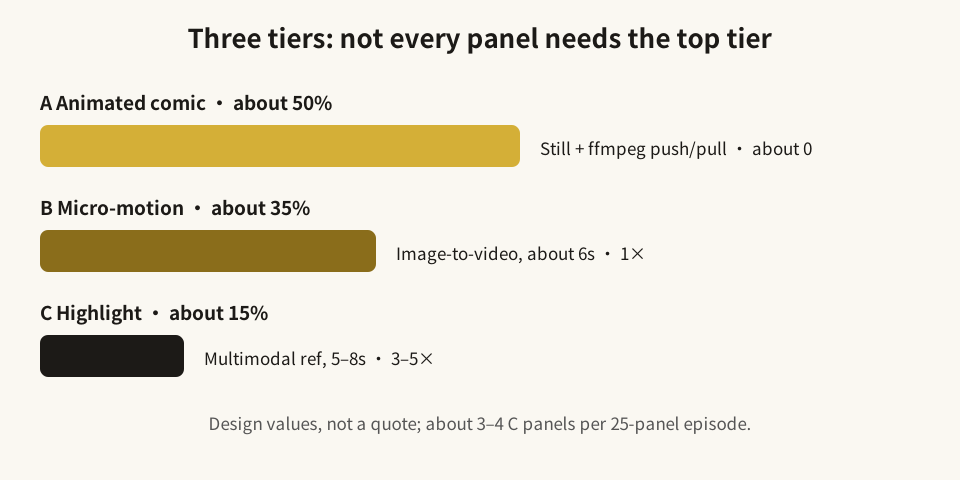
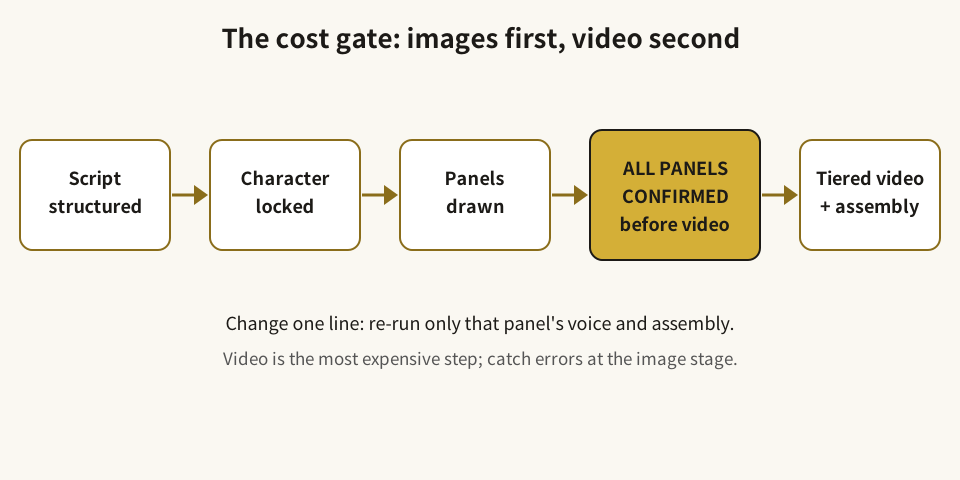
    <content type="html"><![CDATA[<blockquote><p>中文版：<a href="/2026/10/30/video-cost-gate/">视频成本闸门：先把图定下来，再决定哪几格值得“动起来”</a></p></blockquote><h1 id="The-Video-Cost-Gate-Lock-the-Images-First-Then-Decide-Which-Panels-Deserve-to-Move"><a href="#The-Video-Cost-Gate-Lock-the-Images-First-Then-Decide-Which-Panels-Deserve-to-Move" class="headerlink" title="The Video Cost Gate: Lock the Images First, Then Decide Which Panels Deserve to Move"></a>The Video Cost Gate: Lock the Images First, Then Decide Which Panels Deserve to Move</h1><p>Many AI video projects do not die from a lack of ideas. They die because every panel is generated with the most expensive method. Comic drama is especially vulnerable: audiences accept panels that “move just a little,” but they do not require every panel to be produced to short-drama standards. The Danmo comic-drama workbench design takes cost control out of the generation step and puts it into the storyboarding step: images first, confirmation second, tiered video generation third. This article explains what each tier is for, how to choose, and where money is most easily spent on the wrong panel.</p><h2 id="1-The-conclusion-first-not-every-panel-needs-to-“come-alive”"><a href="#1-The-conclusion-first-not-every-panel-needs-to-“come-alive”" class="headerlink" title="1. The conclusion first: not every panel needs to “come alive”"></a>1. The conclusion first: not every panel needs to “come alive”</h2><p>The design divides roughly 25 panels per episode into three tiers. The shares are design values, not measured guarantees:</p><table><thead><tr><th>Tier</th><th>Suitable shots (design share)</th><th>Method</th><th>Relative cost (design value)</th></tr></thead><tbody><tr><td>A — Animated comic</td><td>Dialogue, narration, establishing shots (about 50%)</td><td>Still image + ffmpeg push &#x2F; pull &#x2F; pan (Ken Burns style) + small local motion</td><td>No video API call; relative cost about 0</td></tr><tr><td>B — Micro-motion</td><td>Emotion, turning, walking (about 35%)</td><td>Image-to-video, about 6 seconds</td><td>Set as 1×</td></tr><tr><td>C — Highlight</td><td>Opening hook, fight, reversal, closing cliffhanger (about 15%)</td><td>Multimodal-reference video, about 5–8 seconds, with native ambient sound</td><td>About 3–5× Tier B</td></tr></tbody></table><p>If an entire episode were generated at Tier C, it would cost several times more than the tiered plan; the design roughly estimates the tiered plan can bring an episode below one-third of the all-C cost. <strong>That is a design-stage rough estimate, not a quote and not a measured result.</strong> Actual unit prices follow the platform’s real-time pricing, and any real pricing must wait for a full-episode, end-to-end measurement.</p><p>Tier assignment in the design comes from structured script fields (shot type and mood), and users can manually upgrade or downgrade individual panels. The point is not the tier itself, but that the tier is fixed after the images are confirmed and before video generation starts — not regretted halfway through generation.</p><p><img src="/en/img/cost-tiers-en.svg" alt="Three-tier diagram"><br><em>Diagram: tier shares and relative costs are design values, not a quote.</em></p><h2 id="2-How-to-choose-ask-whether-the-audience-will-stop-at-this-panel"><a href="#2-How-to-choose-ask-whether-the-audience-will-stop-at-this-panel" class="headerlink" title="2. How to choose: ask whether the audience will stop at this panel"></a>2. How to choose: ask whether the audience will stop at this panel</h2><h3 id="Tier-A-information-panels-—-a-slow-push-is-enough"><a href="#Tier-A-information-panels-—-a-slow-push-is-enough" class="headerlink" title="Tier A: information panels — a slow push is enough"></a>Tier A: information panels — a slow push is enough</h3><p>Suitable for: establishing where characters are, establishing a scene, delivering a line of dialogue, delivering narration, two characters talking while standing.</p><p>Test: if this panel were replaced by a still image with a slow push, would the audience lose key information? If not, keep it in Tier A. Tier A’s value is not “lots of motion” but “unbroken rhythm”: the image moves slightly, voice and subtitles keep going, and attention stays on the story instead of waiting for an expensive shot to finish generating.</p><p>The common Tier A waste is promoting a dialogue panel to Tier B or Tier C. A character merely speaking does not become clearer because a full-body action video was generated; it may instead introduce new lip-sync, action, or scene-drift problems.</p><h3 id="Tier-B-emotion-and-displacement-—-one-short-video-to-complete-one-action"><a href="#Tier-B-emotion-and-displacement-—-one-short-video-to-complete-one-action" class="headerlink" title="Tier B: emotion and displacement — one short video to complete one action"></a>Tier B: emotion and displacement — one short video to complete one action</h3><p>Suitable for: emotional change, turning, standing up, walking, picking up or putting down an object, shifting gaze.</p><p>Test: does this panel contain one action that a single image cannot explain? For example, a character rising from a chair, walking from a doorway to a table, or shifting from calm to shocked. Tier B completes that action’s middle process in about 6 seconds; it does not need to tell a whole plot beat.</p><p>The common Tier B waste is writing too complex an action into one panel: turning, running, opening a door, and speaking back, all at once. More actions mean higher failure and regeneration costs. Split the action into one clear action per panel first, then decide whether to upgrade.</p><h3 id="Tier-C-highlight-panels-—-only-the-panels-people-will-stop-for"><a href="#Tier-C-highlight-panels-—-only-the-panels-people-will-stop-for" class="headerlink" title="Tier C: highlight panels — only the panels people will stop for"></a>Tier C: highlight panels — only the panels people will stop for</h3><p>Suitable for: the opening hook, a fight, a reversal, a closing cliffhanger — the panels viewers might screenshot, share, or comment on.</p><p>Test: is this panel the episode’s “memory point”? If its motion were removed, would the climax collapse? Only a “yes” justifies the high-cost multimodal-reference method with native ambient sound.</p><p>The common Tier C waste is treating “beautiful” as “highlight.” A gorgeous panel that is only a transition in story terms should not take a Tier C slot. At about 15% of an episode, Tier C allows roughly 3–4 panels out of 25. That limit is itself a constraint: the more highlight panels there are, the less highlight each one feels.</p><h2 id="3-The-gate-in-practice-images-first-video-second"><a href="#3-The-gate-in-practice-images-first-video-second" class="headerlink" title="3. The gate in practice: images first, video second"></a>3. The gate in practice: images first, video second</h2><p>The design’s core flow can be compressed into one sentence: <strong>video generation unlocks only after all panels are confirmed.</strong> Video is the most expensive step, so errors must be caught at the image stage.</p><p>A recommended order:</p><ol><li><strong>Structure the script first:</strong> split the story into episodes, panels, and per-panel dialogue, action, and mood — not a single block of prose sent straight to generation.</li><li><strong>Lock characters first:</strong> generate and confirm a character sheet for each character, then reuse the same face and outfit features throughout the series; do the same with scene and prop cards, reusing the same base angles.</li><li><strong>Generate panel images first:</strong> produce images panel by panel on a storyboard wall; each panel can be redrawn, re-expressed, or fine-tuned individually, but no video step starts until all panels are confirmed.</li><li><strong>Generate by tier:</strong> produce video by Tier A &#x2F; B &#x2F; C, with voice in parallel; dialogue uses voice synthesis, narration uses a fixed voice, and changing one line only re-runs that panel’s voice and composition — not its video.</li><li><strong>Run a draft first:</strong> the design’s draft mode runs the whole episode at Tier A plus Tier B to check rhythm, and only then produces formal Tier C shots; a formal version can be upscaled from a lower resolution to a higher one rather than generated again from scratch.</li></ol><p>This order has a second benefit: a failed panel retries only that panel; the whole episode does not restart. Cost control is not only “choose the cheaper tier” — it is also “do not pay again for parts that were already correct.”</p><p><img src="/en/img/cost-gate-flow-en.svg" alt="Cost-gate flow diagram"><br><em>Diagram: video generation unlocks only after all panels are confirmed.</em></p><h2 id="4-A-simplified-decision-flow"><a href="#4-A-simplified-decision-flow" class="headerlink" title="4. A simplified decision flow"></a>4. A simplified decision flow</h2><p>For any storyboard panel, ask four questions in order:</p><ol><li>Does this panel mainly deliver dialogue or narration? If it is only information, start with Tier A.</li><li>Does it contain one action that a single image cannot explain? If yes, consider Tier B — and check whether the action is single and clearly executable.</li><li>Is this panel the episode’s memory point? If yes, consider Tier C — and check how many Tier C slots remain.</li><li>Is the image confirmed? If not, generate no video at any tier yet.</li></ol><p>If the answers still leave you unsure, default one tier down: demote a hesitant Tier C to Tier B, and a hesitant Tier B to Tier A. Downgrading usually costs only “a little less motion” in one panel; upgrading costs real generation spend and regeneration risk.</p><h2 id="5-Three-costs-that-are-easy-to-overlook"><a href="#5-Three-costs-that-are-easy-to-overlook" class="headerlink" title="5. Three costs that are easy to overlook"></a>5. Three costs that are easy to overlook</h2><p><strong>Regeneration cost.</strong> The more complex the prompt, the more actions it packs in, and the less clearly each reference image’s role is defined, the more likely regeneration becomes. The cost gate therefore includes prompt checks: one prompt, one scene, one clear action; each reference asset with an explicit role; character hairstyle, age&#x2F;gender, clothing colors, and lighting repeated in every relevant prompt.</p><p><strong>Confirmation cost.</strong> Ten extra minutes confirming images can save several video regenerations later. Conversely, batch-generating video before images are confirmed trades the cheapest chance to fix an error for the most expensive one.</p><p><strong>Revision cost.</strong> Changing one line, one expression, or one panel order — does it re-run the whole episode or only the affected panel? The design re-runs only the affected panel. When budgeting, ask not only for the generation unit price but also for the revision granularity: “one panel” or “the whole episode”?</p><h2 id="Conclusion-run-through-this-before-your-first-episode"><a href="#Conclusion-run-through-this-before-your-first-episode" class="headerlink" title="Conclusion: run through this before your first episode"></a>Conclusion: run through this before your first episode</h2><ul><li><input disabled="" type="checkbox"> Is the episode split into one card per panel, each with dialogue, action, and mood?</li><li><input disabled="" type="checkbox"> Are character sheets and scene cards confirmed and reused with the same features throughout?</li><li><input disabled="" type="checkbox"> Are all panel images confirmed before any video step starts?</li><li><input disabled="" type="checkbox"> Is Tier C reserved for the opening hook, fight, reversal, and closing cliffhanger — about 15%?</li><li><input disabled="" type="checkbox"> Does each Tier B action contain only one, clearly executable action?</li><li><input disabled="" type="checkbox"> Does changing one line re-run only that panel’s voice and composition?</li><li><input disabled="" type="checkbox"> Does a draft run at Tier A plus Tier B to check rhythm before formal Tier C shots are produced?</li><li><input disabled="" type="checkbox"> Does the budget separate “design share,” “relative cost,” and “real-time platform unit price,” without writing an estimate as a quote?</li></ul><p>“Images first, video second” is not slower. It simply moves the most expensive step to the moment when errors are fewest — so you know, before generating, which panels in this episode deserve to move, and which ones only need to move just enough.</p>]]></content>


    <summary type="html">&lt;blockquote&gt;
&lt;p&gt;中文版：&lt;a href=&quot;/2026/10/30/video-cost-gate/&quot;&gt;视频成本闸门：先把图定下来，再决定哪几格值得“动起来”&lt;/a&gt;&lt;/p&gt;
&lt;/blockquote&gt;
&lt;h1 id=&quot;The-Video-Cost-Gate-Loc</summary>


    <category term="AI Video" scheme="https://blog.o-coc.com/en/categories/AI-Video/"/>
    
    
    <category term="H3" scheme="https://blog.o-coc.com/en/tags/H3/"/>
    
    <category term="image-to-video" scheme="https://blog.o-coc.com/en/tags/image-to-video/"/>
    
    <category term="comic drama" scheme="https://blog.o-coc.com/en/tags/comic-drama/"/>
    
    <category term="cost control" scheme="https://blog.o-coc.com/en/tags/cost-control/"/>
    
    <category term="storyboarding" scheme="https://blog.o-coc.com/en/tags/storyboarding/"/>
    
  </entry>
  
</feed>