
The Video Cost Gate: Lock the Images First, Then Decide Which Panels Deserve to Move
The Video Cost Gate: Lock the Images First, Then Decide Which Panels Deserve to Move
Many AI video projects do not die from a lack of ideas. They die because every panel is generated with the most expensive method. Comic drama is especially vulnerable: audiences accept panels that “move just a little,” but they do not require every panel to be produced to short-drama standards. The Danmo comic-drama workbench design takes cost control out of the generation step and puts it into the storyboarding step: images first, confirmation second, tiered video generation third. This article explains what each tier is for, how to choose, and where money is most easily spent on the wrong panel.
1. The conclusion first: not every panel needs to “come alive”
The design divides roughly 25 panels per episode into three tiers. The shares are design values, not measured guarantees:
| Tier | Suitable shots (design share) | Method | Relative cost (design value) |
|---|---|---|---|
| A — Animated comic | Dialogue, narration, establishing shots (about 50%) | Still image + ffmpeg push / pull / pan (Ken Burns style) + small local motion | No video API call; relative cost about 0 |
| B — Micro-motion | Emotion, turning, walking (about 35%) | Image-to-video, about 6 seconds | Set as 1× |
| C — Highlight | Opening hook, fight, reversal, closing cliffhanger (about 15%) | Multimodal-reference video, about 5–8 seconds, with native ambient sound | About 3–5× Tier B |
If an entire episode were generated at Tier C, it would cost several times more than the tiered plan; the design roughly estimates the tiered plan can bring an episode below one-third of the all-C cost. That is a design-stage rough estimate, not a quote and not a measured result. Actual unit prices follow the platform’s real-time pricing, and any real pricing must wait for a full-episode, end-to-end measurement.
Tier assignment in the design comes from structured script fields (shot type and mood), and users can manually upgrade or downgrade individual panels. The point is not the tier itself, but that the tier is fixed after the images are confirmed and before video generation starts — not regretted halfway through generation.
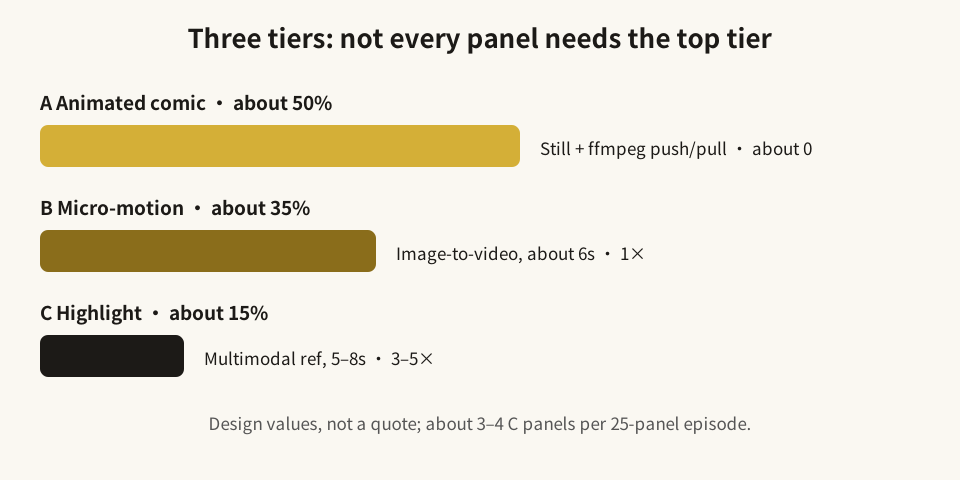
Diagram: tier shares and relative costs are design values, not a quote.
2. How to choose: ask whether the audience will stop at this panel
Tier A: information panels — a slow push is enough
Suitable for: establishing where characters are, establishing a scene, delivering a line of dialogue, delivering narration, two characters talking while standing.
Test: if this panel were replaced by a still image with a slow push, would the audience lose key information? If not, keep it in Tier A. Tier A’s value is not “lots of motion” but “unbroken rhythm”: the image moves slightly, voice and subtitles keep going, and attention stays on the story instead of waiting for an expensive shot to finish generating.
The common Tier A waste is promoting a dialogue panel to Tier B or Tier C. A character merely speaking does not become clearer because a full-body action video was generated; it may instead introduce new lip-sync, action, or scene-drift problems.
Tier B: emotion and displacement — one short video to complete one action
Suitable for: emotional change, turning, standing up, walking, picking up or putting down an object, shifting gaze.
Test: does this panel contain one action that a single image cannot explain? For example, a character rising from a chair, walking from a doorway to a table, or shifting from calm to shocked. Tier B completes that action’s middle process in about 6 seconds; it does not need to tell a whole plot beat.
The common Tier B waste is writing too complex an action into one panel: turning, running, opening a door, and speaking back, all at once. More actions mean higher failure and regeneration costs. Split the action into one clear action per panel first, then decide whether to upgrade.
Tier C: highlight panels — only the panels people will stop for
Suitable for: the opening hook, a fight, a reversal, a closing cliffhanger — the panels viewers might screenshot, share, or comment on.
Test: is this panel the episode’s “memory point”? If its motion were removed, would the climax collapse? Only a “yes” justifies the high-cost multimodal-reference method with native ambient sound.
The common Tier C waste is treating “beautiful” as “highlight.” A gorgeous panel that is only a transition in story terms should not take a Tier C slot. At about 15% of an episode, Tier C allows roughly 3–4 panels out of 25. That limit is itself a constraint: the more highlight panels there are, the less highlight each one feels.
3. The gate in practice: images first, video second
The design’s core flow can be compressed into one sentence: video generation unlocks only after all panels are confirmed. Video is the most expensive step, so errors must be caught at the image stage.
A recommended order:
- Structure the script first: split the story into episodes, panels, and per-panel dialogue, action, and mood — not a single block of prose sent straight to generation.
- Lock characters first: generate and confirm a character sheet for each character, then reuse the same face and outfit features throughout the series; do the same with scene and prop cards, reusing the same base angles.
- Generate panel images first: produce images panel by panel on a storyboard wall; each panel can be redrawn, re-expressed, or fine-tuned individually, but no video step starts until all panels are confirmed.
- Generate by tier: produce video by Tier A / B / C, with voice in parallel; dialogue uses voice synthesis, narration uses a fixed voice, and changing one line only re-runs that panel’s voice and composition — not its video.
- Run a draft first: the design’s draft mode runs the whole episode at Tier A plus Tier B to check rhythm, and only then produces formal Tier C shots; a formal version can be upscaled from a lower resolution to a higher one rather than generated again from scratch.
This order has a second benefit: a failed panel retries only that panel; the whole episode does not restart. Cost control is not only “choose the cheaper tier” — it is also “do not pay again for parts that were already correct.”
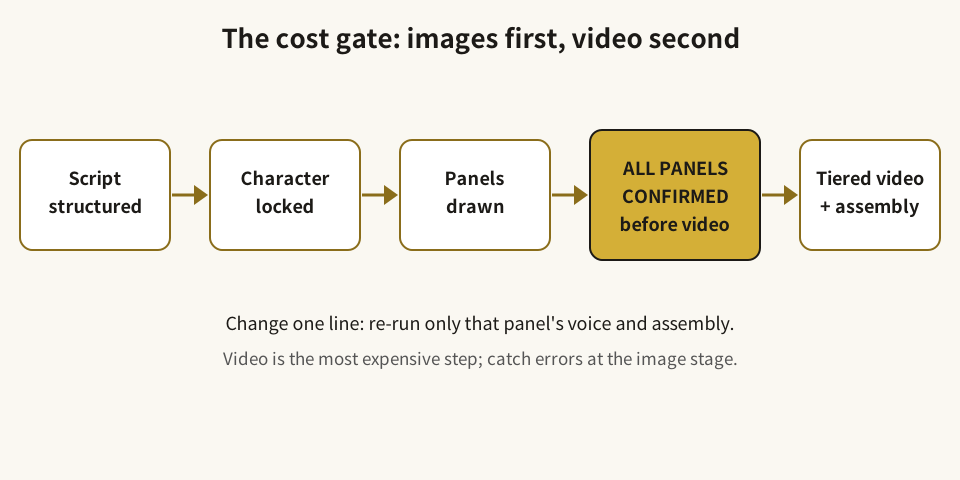
Diagram: video generation unlocks only after all panels are confirmed.
4. A simplified decision flow
For any storyboard panel, ask four questions in order:
- Does this panel mainly deliver dialogue or narration? If it is only information, start with Tier A.
- Does it contain one action that a single image cannot explain? If yes, consider Tier B — and check whether the action is single and clearly executable.
- Is this panel the episode’s memory point? If yes, consider Tier C — and check how many Tier C slots remain.
- Is the image confirmed? If not, generate no video at any tier yet.
If the answers still leave you unsure, default one tier down: demote a hesitant Tier C to Tier B, and a hesitant Tier B to Tier A. Downgrading usually costs only “a little less motion” in one panel; upgrading costs real generation spend and regeneration risk.
5. Three costs that are easy to overlook
Regeneration cost. The more complex the prompt, the more actions it packs in, and the less clearly each reference image’s role is defined, the more likely regeneration becomes. The cost gate therefore includes prompt checks: one prompt, one scene, one clear action; each reference asset with an explicit role; character hairstyle, age/gender, clothing colors, and lighting repeated in every relevant prompt.
Confirmation cost. Ten extra minutes confirming images can save several video regenerations later. Conversely, batch-generating video before images are confirmed trades the cheapest chance to fix an error for the most expensive one.
Revision cost. Changing one line, one expression, or one panel order — does it re-run the whole episode or only the affected panel? The design re-runs only the affected panel. When budgeting, ask not only for the generation unit price but also for the revision granularity: “one panel” or “the whole episode”?
Conclusion: run through this before your first episode
- Is the episode split into one card per panel, each with dialogue, action, and mood?
- Are character sheets and scene cards confirmed and reused with the same features throughout?
- Are all panel images confirmed before any video step starts?
- Is Tier C reserved for the opening hook, fight, reversal, and closing cliffhanger — about 15%?
- Does each Tier B action contain only one, clearly executable action?
- Does changing one line re-run only that panel’s voice and composition?
- Does a draft run at Tier A plus Tier B to check rhythm before formal Tier C shots are produced?
- Does the budget separate “design share,” “relative cost,” and “real-time platform unit price,” without writing an estimate as a quote?
“Images first, video second” is not slower. It simply moves the most expensive step to the moment when errors are fewest — so you know, before generating, which panels in this episode deserve to move, and which ones only need to move just enough.